
Architecture
How kftray components share configs, forward traffic and handle permissions.
kftray and kftui share a config database and port-forwarding code. Each app tracks its own active forwards.
Component structure
| Component | Role |
|---|---|
kftray-commons | Shared types, config models and utilities |
kftray-portforward | Port forwarding, Kubernetes API access and TCP/UDP handling |
kftray-tauri | Tauri desktop interface, system tray and app state |
kftui | Ratatui terminal interface and keyboard navigation |
kftray-mcp | MCP server for port-forwarding operations over HTTP with JSON-RPC |
kftray-helper | Helper for binding low ports and changing the hosts file with elevated permissions |
kftray-server | In-cluster relay server for UDP, proxy and expose traffic |
kftray-http-logs | HTTP request and response parsing and logging |
The desktop and terminal apps read the same saved configs. The MCP server uses that database too.
Forwarding lifecycle
The tools share a Rust core that handles all Kubernetes interaction. A forward goes through these steps:
Config management: load port-forward configs from local files, GitHub or Kubernetes annotations.
Pod discovery: find target pods with label selectors or service definitions.
Connection setup: open a WebSocket connection to the Kubernetes API.
Traffic relay: forward traffic between local ports and pod ports.
Health monitoring: watch for pod changes and reconnect when needed.
For UDP, or when you need to reach external services, kftray deploys a small relay pod in your cluster to do the forwarding. See relay server.
Shared state
kftray stores configs in configs.db inside the configuration directory. The default location is ~/.kftray/configs.db when no path override is set:
-- Simplified schema
CREATE TABLE configs (
    id INTEGER PRIMARY KEY,
    alias TEXT NOT NULL,
    context TEXT NOT NULL,
    namespace TEXT NOT NULL,
    service TEXT,
    pod TEXT,
    local_port INTEGER NOT NULL,
    remote_port INTEGER NOT NULL,
    protocol TEXT DEFAULT 'tcp',
    -- ... additional fields
);
SQLite locks let both apps read and write configs without corrupting the database. To stop an active forward, use the app that started it.
TCP forwarding architecture
Direct TCP forwarding uses the Kubernetes API's port-forward subprotocol:
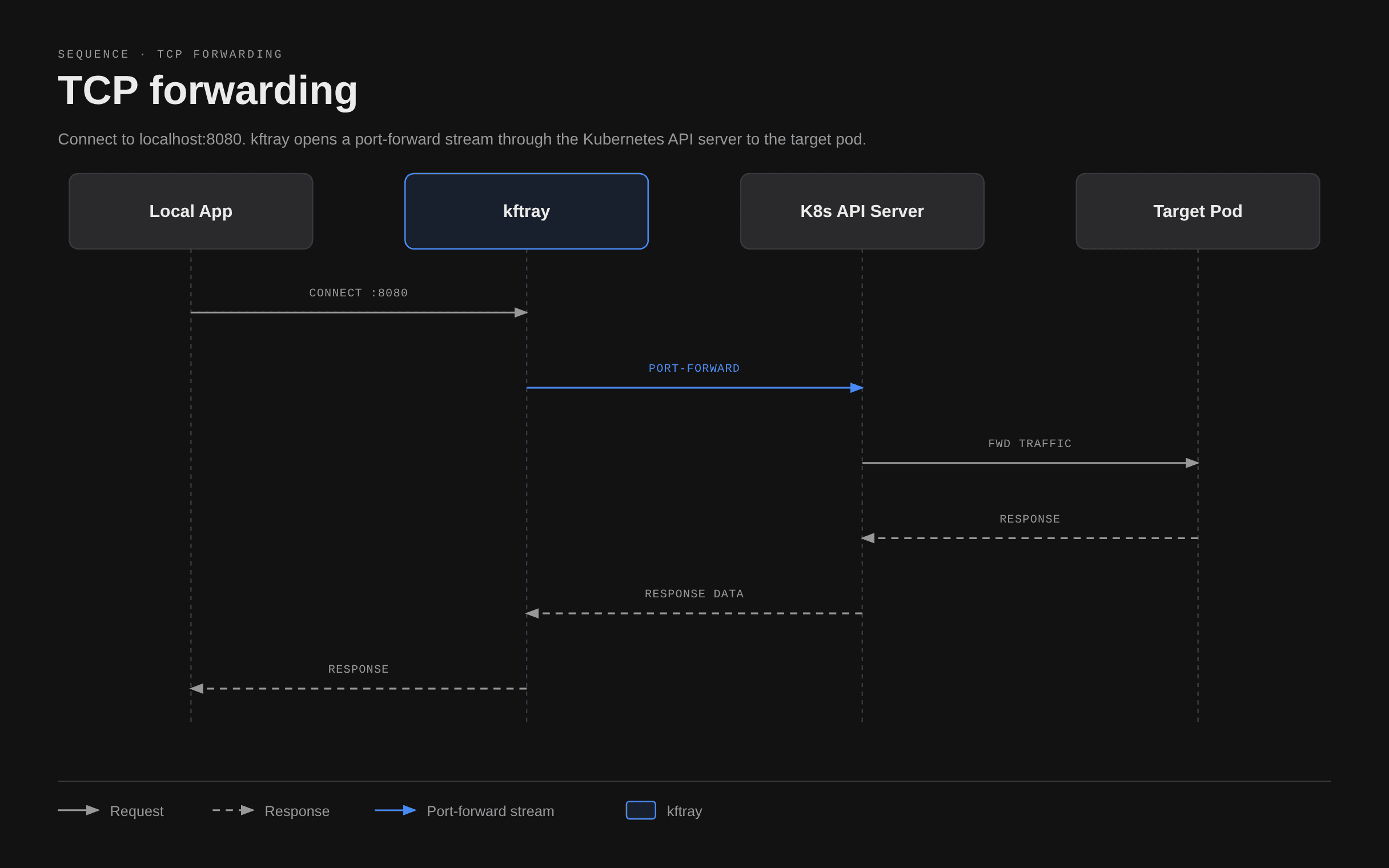
This follows the same path as kubectl port-forward, with comparable performance. The kftray-portforward component keeps a WebSocket connection to the Kubernetes API server. It carries multiple TCP connections over that connection.
See port forwarding configuration for examples.
Proxy TCP forwarding architecture
Proxy forwarding adds the kftray-server pod between your local app and the upstream server. The local TCP connection goes to the kftray-server pod, which sends the TCP packets on to the upstream server:
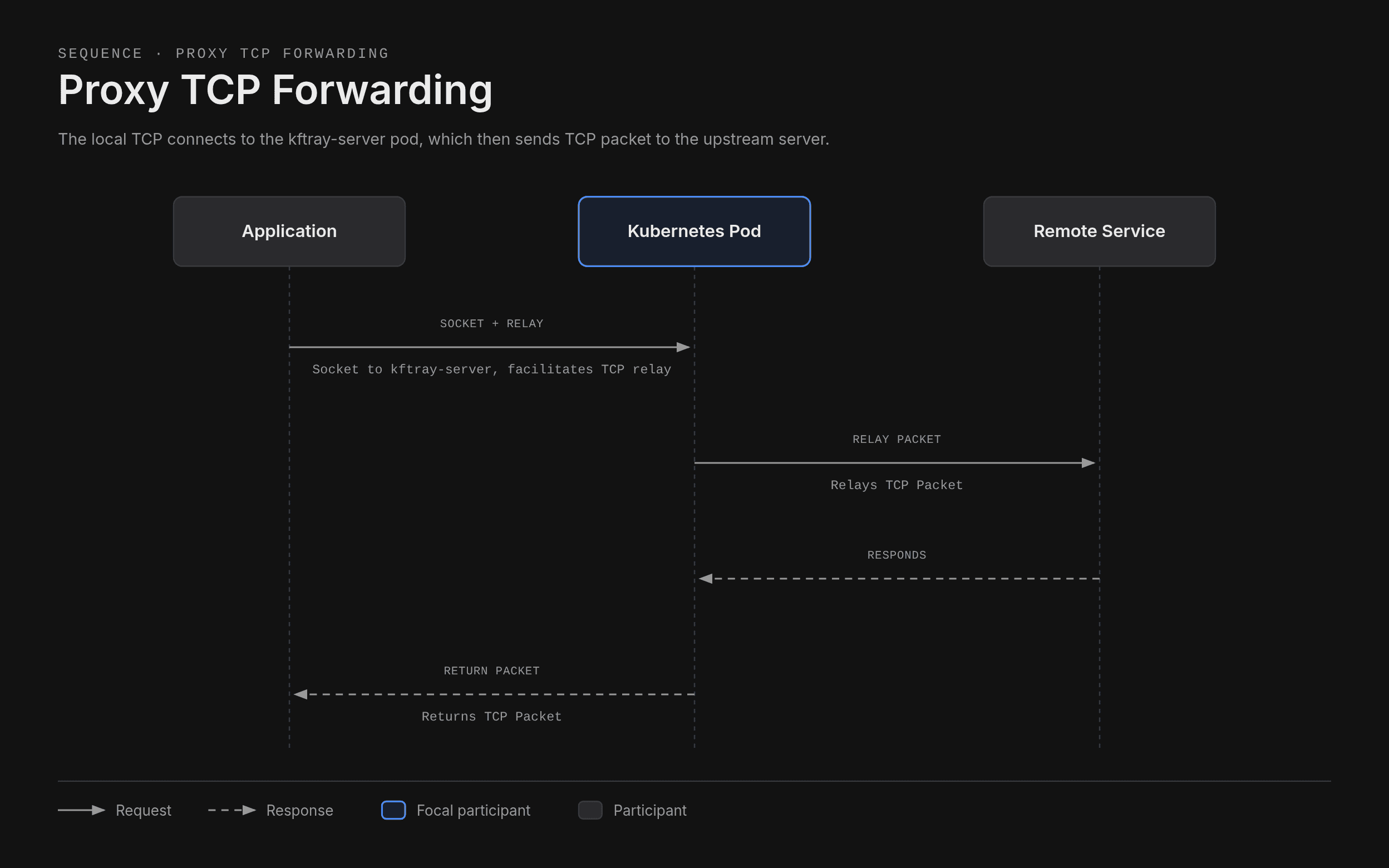
See proxy forwarding for configs and use cases.
UDP forwarding architecture
Kubernetes port-forward only supports TCP. To forward UDP, kftray converts packets to TCP and sends them to an in-cluster proxy:
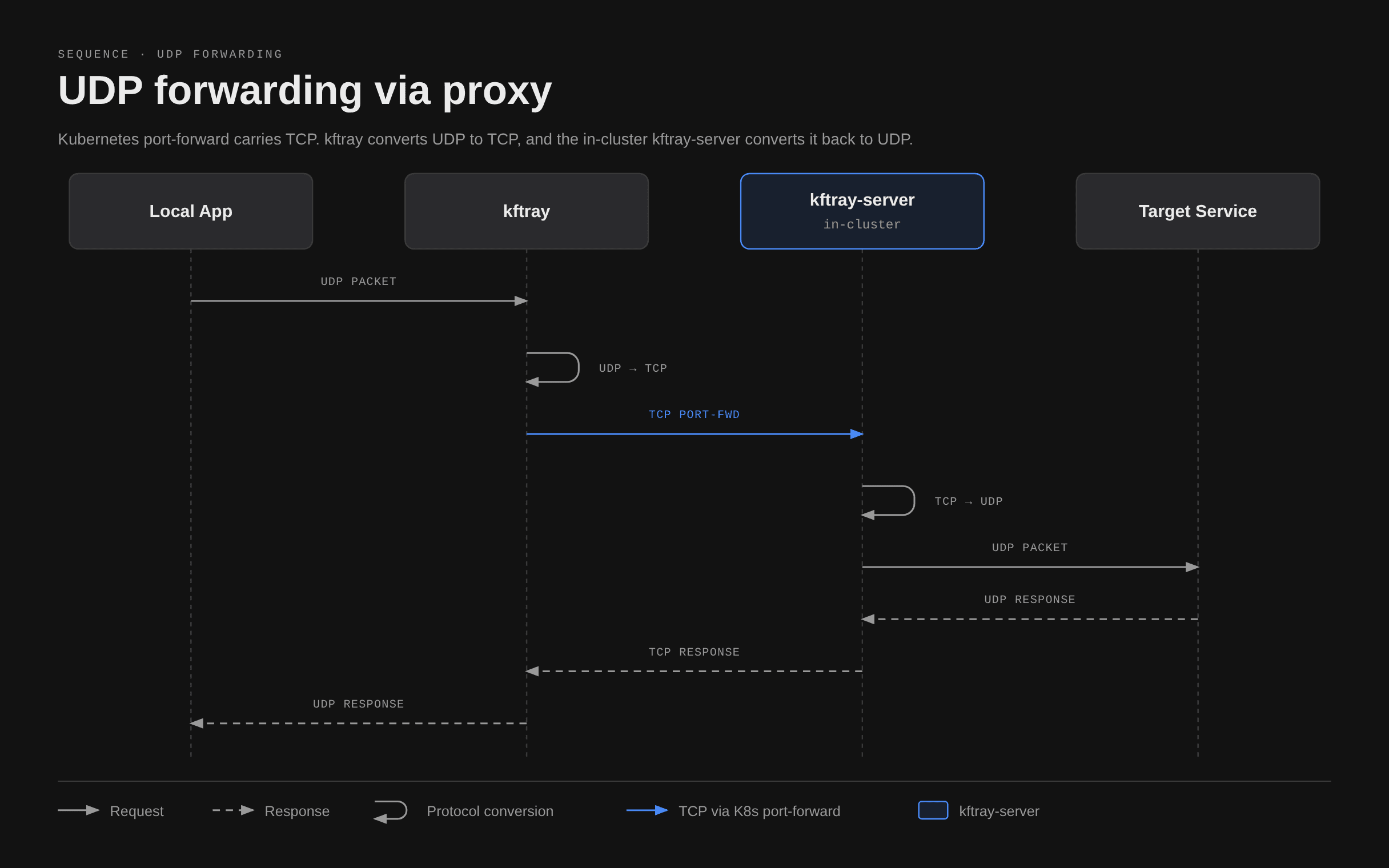
kftray opens a local UDP socket and connects a local TCP socket to the kftray-server pod. The TCP socket sends the UDP packets over TCP, and the server forwards them to the upstream server.
kftray deploys kftray-server in the target namespace when you create a UDP forward. It removes the deployment when no UDP forwards remain active.
See proxy forwarding for setup details.
Proxy server deployment
When you create a UDP forward, kftray:
Checks for a kftray-server deployment in the target namespace.
Creates the deployment if it's missing, with resource requests of 10m CPU and 32Mi memory.
Waits for the pod to become ready, typically 2-5 seconds.
Starts a TCP port forward to the proxy pod.
Starts converting UDP packets to TCP.
Multiple UDP forwards in a namespace share the proxy pod.
Proxy persistence
If kftray crashes or you force it to stop, the proxy deployment may stay in the cluster. To remove it, run kubectl delete deployment kftray-server -n <namespace>.
HTTP logging implementation
HTTP logging reads requests and responses from TCP traffic. The kftray-http-logs component:
Reads TCP traffic between your local app and the Kubernetes API.
Parses HTTP/1.1 requests and responses as they arrive.
Assigns trace IDs to match requests with responses.
Writes JSON logs to ~/.kftray/http_logs/.
Each log entry uses this format:
{
  "timestamp": "2026-02-09T10:30:45.123Z",
  "trace_id": "abc123",
  "direction": "request",
  "method": "GET",
  "path": "/api/users",
  "headers": {"Host": "api.example.com"},
  "body": null
}
Parsing adds 1-5 ms per request. Turn off HTTP logging when that delay would affect your work.
Helper component
The kftray-helper binary handles operations that need elevated permissions:
- Binding ports below
1024on macOS and Linux. - Updating
/etc/hostsfor custom domain mappings.
When you bind a port below 1024, kftray:
Asks for an administrator password on macOS or Linux, or UAC approval on Windows.
Starts kftray-helper with elevated permissions.
Asks the helper to bind the port.
Uses the helper to forward traffic to kftray, which runs as your user.
Drops the helper's elevated permissions after binding.
Security model
Credential management
kftray uses the same kubeconfig files as kubectl:
- The default file is
~/.kube/config. - Set
KUBECONFIGto use a different path. - Separate multiple paths in
KUBECONFIGwith colons.
The Kubernetes client library reads credentials from kubeconfig files at runtime. kftray doesn't store those credentials in its database.
For cloud providers, kftray uses the same credential helpers as kubectl:
| Provider | Helper |
|---|---|
| GKE | gcloud CLI |
| EKS | aws CLI with aws-iam-authenticator |
| AKS | az CLI |
See CLI reference for environment variables.
Network security
kftray binds to 127.0.0.1 by default. Only apps on your machine can reach the forward:
{
  "local_address": "127.0.0.1",
  "local_port": 8080
}
Binding to 0.0.0.0 makes the forward available to your network:
{
  "local_address": "0.0.0.0",
  "local_port": 8080
}
Network exposure
Anyone on your network can access the forwarded service when you bind to 0.0.0.0. Use this address only when you need network access, and record the reason in your config.
MCP server
The MCP server lets external clients call kftray operations over HTTP:
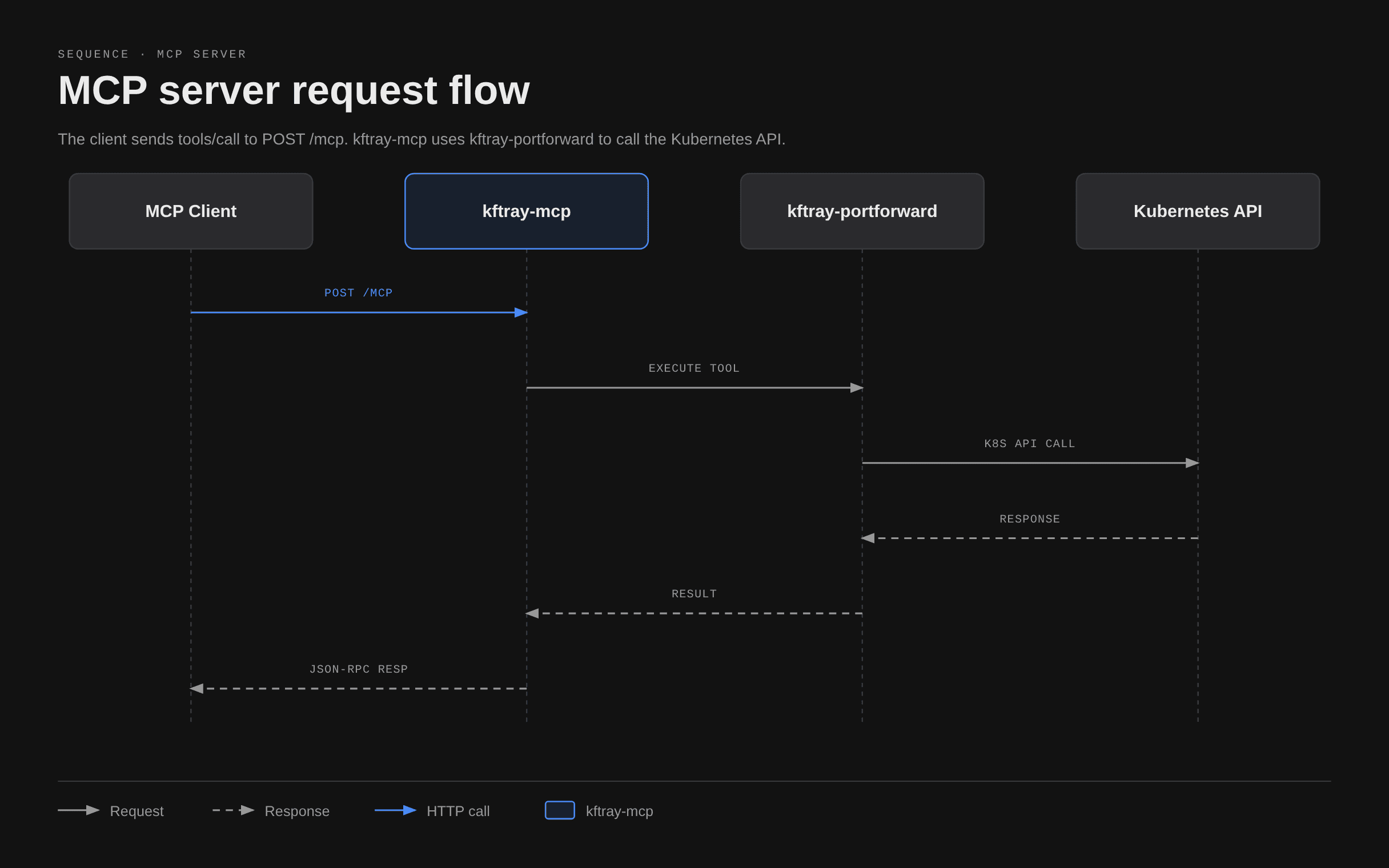
The server has 16 tools for finding Kubernetes resources, managing port forwards and reading or changing configs. It uses kftray-portforward and kftray-commons, so these operations work the same way as in the desktop and terminal apps.
The server runs inside the desktop app. kftray-tauri starts and stops it based on the MCP settings.
Privilege separation
| Process | Permissions |
|---|---|
| Main app | Runs as your user without elevated permissions |
| Helper | Uses elevated permissions when needed and drops them after binding |
| Proxy server | Uses limited Kubernetes role-based access control (RBAC) permissions |
On macOS, signing and verification protect the helper binary against tampering.
For release verification, SBOMs and vulnerability reporting, see Security.