
Workload Types
The four forwarding modes (service, pod, proxy and expose), their required fields and when to use each.
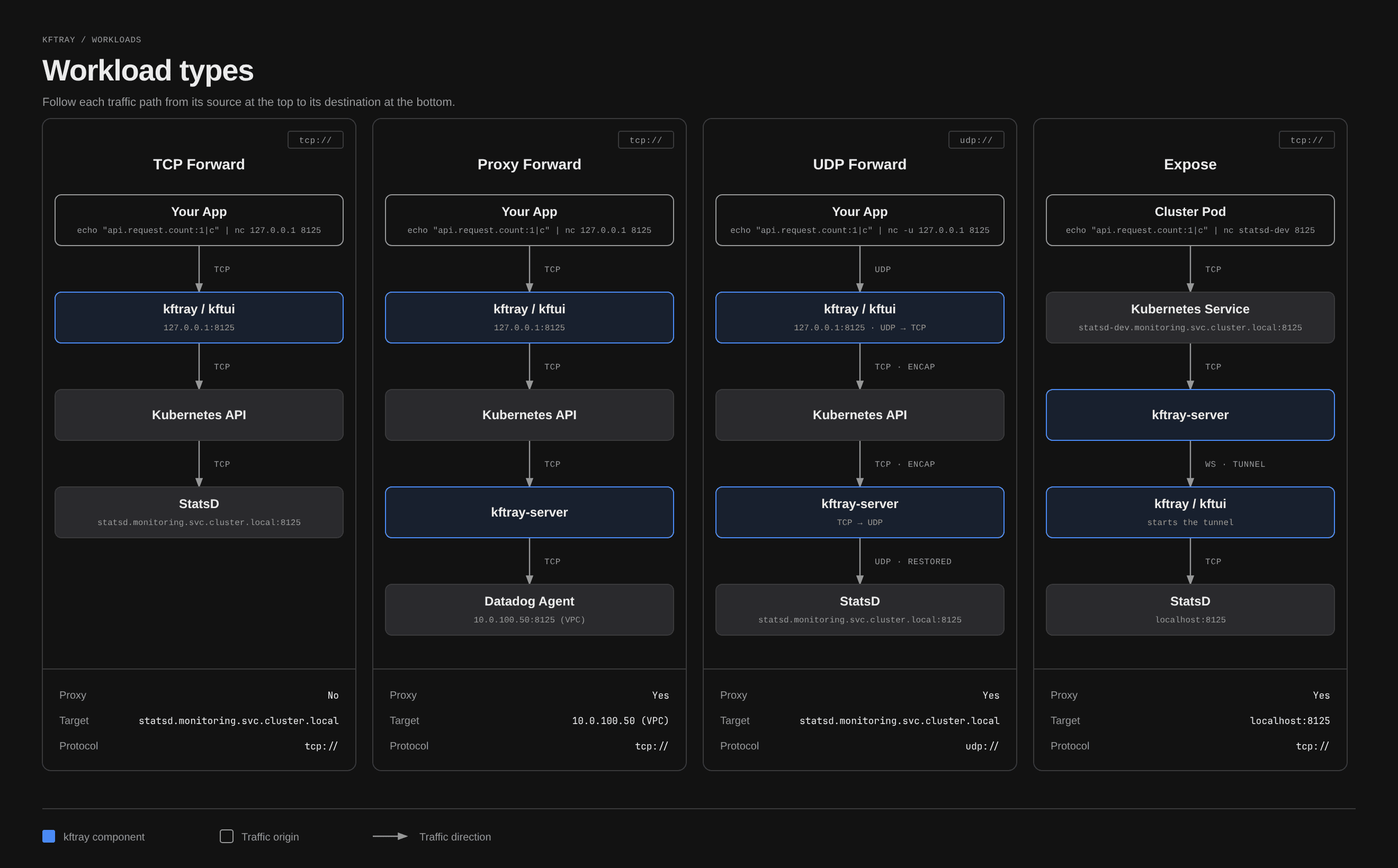
Choose a workload type based on the target you need to reach and the direction of traffic. Set it with the workload_type field. Every workload works with the same JSON format, and the configuration reference lists the required fields.
Service
{
  "alias": "postgres",
  "service": "postgres",
  "workload_type": "service",
  "namespace": "default",
  "local_port": 5432,
  "remote_port": 5432,
  "context": "dev",
  "protocol": "tcp"
}
Service mode forwards to a Kubernetes Service, using a healthy pod it selects. Use it for most forwards, since it survives pod restarts and scaling. It supports TCP and UDP.
remote_port is the container port on the selected pod. kftray doesn't translate a Service's exposed port a second time.
Pod
{
  "alias": "debug-app",
  "workload_type": "pod",
  "target": "app=myapp",
  "namespace": "default",
  "local_port": 9229,
  "remote_port": 9229,
  "context": "dev",
  "protocol": "tcp"
}
Pod mode forwards directly to a pod chosen by a label selector in target. Use it to debug a particular pod or when no service exists. It supports TCP and UDP. A pod config doesn't need a service field.
For a pod label target, the desktop app lists each remote port name and number once. Matching replicas don't add duplicate entries.
Proxy
{
  "alias": "internal-api",
  "workload_type": "proxy",
  "remote_address": "internal-api.company.com",
  "remote_port": 443,
  "local_port": 8443,
  "namespace": "default",
  "context": "prod-cluster",
  "protocol": "tcp"
}
Proxy mode routes traffic through a kftray-server pod to reach hosts your machine can't access directly. It supports TCP and UDP. The destination is remote_address plus remote_port, and the config doesn't need a service.
See Proxy Forwarding for deployment details and use cases.
Expose (reverse tunneling)
Expose mode shares a local development server with your team or the internet through your Kubernetes cluster. The traffic goes through the kftray-server pod to your machine.
Use it to:
- Test webhooks from external services against your local server
- Share work in progress with teammates through a URL the cluster can reach
- Run local services that other pods in the cluster need to reach
Set "exposure_type": "internal" to make the service reachable only inside the cluster. Set it to "public" to create an ingress, with optional TLS through cert-manager.
Public, with a Let's Encrypt certificate:
{
  "alias": "myapp.example.com",
  "namespace": "production",
  "local_port": 3000,
  "local_address": "localhost",
  "context": "my-k8s-cluster",
  "workload_type": "expose",
  "protocol": "tcp",
  "domain_enabled": true,
  "exposure_type": "public",
  "cert_manager_enabled": true,
  "cert_issuer": "letsencrypt-prod",
  "cert_issuer_kind": "ClusterIssuer",
  "ingress_class": "nginx"
}
Internal, for the cluster network only:
{
  "alias": "internal-api",
  "namespace": "development",
  "local_port": 8080,
  "local_address": "localhost",
  "context": "my-k8s-cluster",
  "workload_type": "expose",
  "protocol": "tcp",
  "domain_enabled": true,
  "exposure_type": "internal"
}
Expose configuration fields
| Field | Description |
|---|---|
alias | Required. kftray uses it to name the Kubernetes resources it creates |
local_port | Required. The local port to share |
local_address | Address of your local server, for example localhost |
exposure_type | "internal" (cluster only) or "public" (internet through an ingress) |
cert_manager_enabled | Turns on automatic TLS certificates through cert-manager |
cert_issuer | cert-manager issuer name, for example "letsencrypt-prod". Required for a public expose with cert-manager |
cert_issuer_kind | "Issuer" or "ClusterIssuer" |
ingress_class | Ingress class for public exposure, for example "nginx" |
ingress_annotations | Extra ingress annotations as a JSON object inside a string |
Expose behavior
- Expose waits for its server and the reverse WebSocket handshake before it reports success. Kubernetes Service routing can still take time to converge after the Service is created.
Stop Allalso stops expose tunnels.- Expose uses the Kubernetes resources kftray creates in the config's namespace. The server resources view lists them for cleanup.
- A public exposure uses the ingress class you set in
ingress_class, and a certificate uses the cert-manager issuer you name incert_issuer. Both need to exist in your cluster.
For more configs, see the examples.