
How It Works
How kftray sends TCP and UDP traffic through Kubernetes and reconnects when connections drop.
kftray and kftui share one Rust core that handles all the Kubernetes work. They send local traffic through the Kubernetes API to your cluster and store port-forward configs so you can reuse them.
The Forwarding Pipeline
Every port forward goes through these phases:
Configure: choose a target service, ports and protocol in JSON or the desktop app. kftray loads configs from files, GitHub or Kubernetes service annotations, and stores them in a local SQLite database.
Discover: kftray finds the target pods with label selectors or the service definition. It picks a Ready pod, and it waits for one if the pods are being recreated.
Connect: kftray authenticates with the Kubernetes API using your kubeconfig credentials. It opens a WebSocket port-forward stream to the target pod.
Forward: local traffic on your chosen port flows through the Kubernetes API to the cluster workload. For UDP and proxy forwards, a relay pod in the cluster does the actual forwarding.
Reconnect: kftray watches pod changes through the Kubernetes watch API. When pods restart, nodes restart or the network drops, it reconnects to a healthy pod.
For service and pod forwards, readiness, named-port resolution and the first connection share one 60-second deadline. If kftray can't connect in that time, the start fails.
TCP Forwarding
For TCP services, kftray works like kubectl port-forward and adds automatic reconnection and management of many forwards at once:
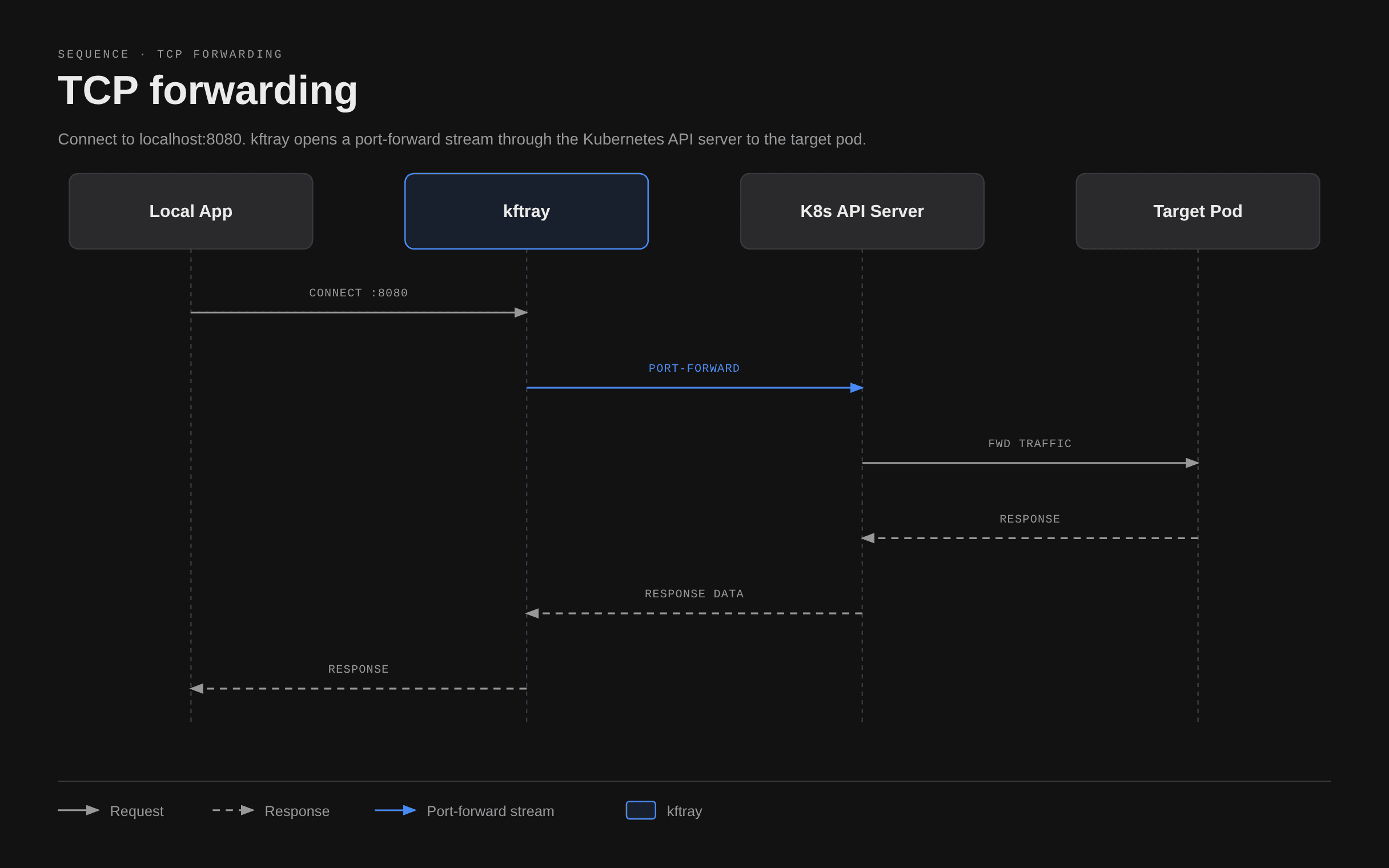
When the target pod restarts, kftray detects the change and reconnects to the replacement pod.
UDP Forwarding
Kubernetes doesn't support UDP port forwarding natively, so kftray uses a proxy:
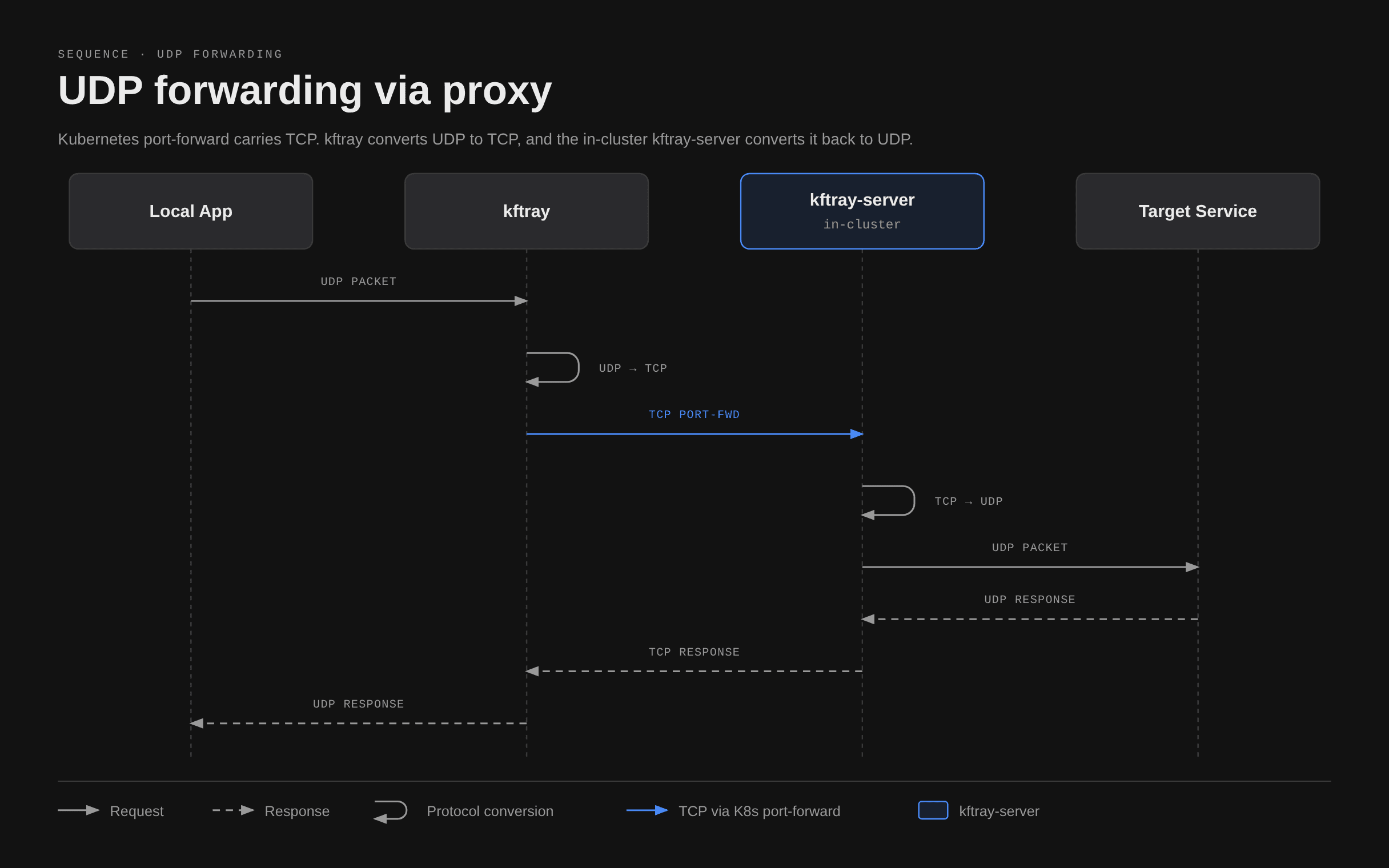
kftray deploys a kftray-server pod to convert traffic between UDP and TCP. This adds one network hop and lets you reach DNS, DHCP and UDP-based message queues. The same pod carries proxy forwards to hosts outside the cluster.
See Proxy Forwarding for deployment details and configuration.
Expose
The expose workload runs the other way. It tunnels a local service to the cluster or the internet. The kftray-server pod receives traffic in the cluster and sends it back to your machine over a reverse WebSocket. kftray reports success only after the server is up and the WebSocket handshake finishes. See Workload Types.
Shared State Model
The desktop and terminal interfaces share one SQLite database, configs.db, in the configuration directory (~/.kftray by default). The MCP server also reads it when you turn it on:
- Configurations created in one interface appear in the other.
- Both interfaces show runtime status, including which forwards are active.
- Each app manages its own active forwards. To stop a forward, use the app that started it.
- kftui can run against an in-memory database instead, when it loads configs without
--save.
Core Components
| Component | Role |
|---|---|
kftray-portforward | Core forwarding logic, Kubernetes API integration and reconnection |
kftray-tauri | Desktop GUI (Tauri framework), system tray and HTTP log viewer |
kftui | Terminal interface with keyboard-driven management |
kftray-mcp | MCP server that exposes port-forwarding operations to external clients |
kftray-server | In-cluster proxy for UDP forwarding, proxy workloads and expose |
kftray-commons | Shared config models, SQLite database access and utilities |
kftray-helper | Operations that need elevated permissions, such as hosts file edits and loopback addresses |
kftray-http-logs | HTTP traffic interception and logging |
For more architecture detail, see Architecture.